
This standard operating procedure and technical reference was authored by Toan Nguyen (Toan Nguyen IT OZ). Connect with over 20+ years of banking and enterprise systems administration experience on LinkedIn.
1. Scenario Overview & Problem Context
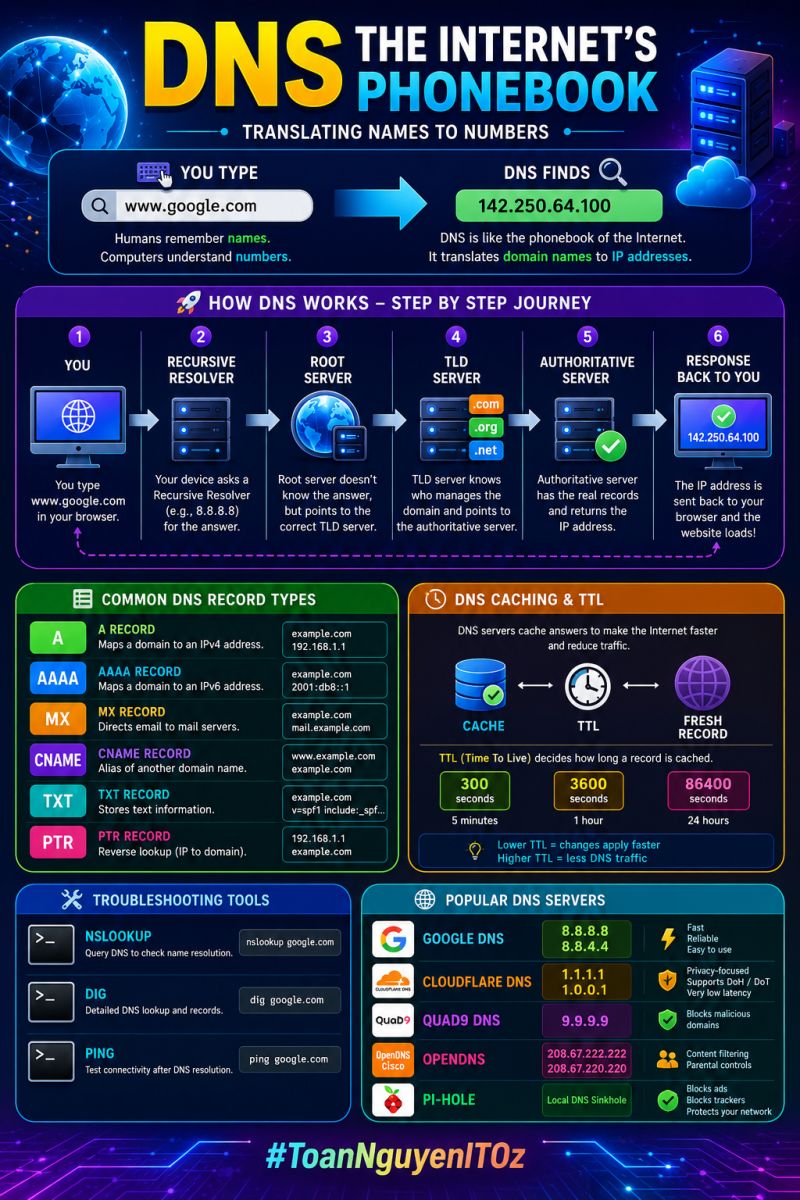
Every time you type a website address like:
🔹 www.google.com
🔹 www.youtube.com
2. Step-by-Step Diagnostic & Implementation SOP
To resolve or implement this standard operating procedure effectively, execute the following technical workflow:
-
Every time you type a website address li: Every time you type a website address like:
-
🔹 www.google.com: 🔹 www.google.com
-
🔹 www.youtube.com: 🔹 www.youtube.com
-
🔹 www.github.com: 🔹 www.github.com
-
your computer doesn’t understand those n: your computer doesn’t understand those names.
-
💻 Computers communicate using IP address: 💻 Computers communicate using IP addresses, while humans prefer easy-to-remember names.
3. Production Command Scripts & Automation
1
2
3
4
5
6
# Flush local resolver cache and inspect authoritative DNS servers
Clear-DnsClientCache
Get-DnsClientServerAddress -AddressFamily IPv4

# Perform authoritative forward DNS resolution query
Resolve-DnsName -Name "toannguyenitoz.github.io" -Type A -DnsOnly
4. Technical Breakdown & Architecture Deep Dive
Understanding the low-level operating system mechanics and service interactions prevents unintended side effects:
<span class="cmd-tag">Administrative Security Context</span>: Operations altering system state require local administrator privileges or domain delegatory rights.<span class="cmd-tag">Service Architecture</span>: Windows services and WMI/CIM providers interact directly with the hardware abstraction layer and kernel objects.- Enterprise Scale: Implementing scripted automation reduces Mean Time to Resolution (MTTR) from hours to minutes across distributed endpoints.
5. Enterprise Verification Checklist
| Checkpoint | Verification Step | Common Remediation |
|---|---|---|
| Administrative Privilege | Run whoami /priv or verify elevated prompt |
Launch PowerShell or Terminal via Run as Administrator |
| Port & Network Health | Test TCP handshake via Test-NetConnection |
Verify firewall state and domain edge security rules |
| Service Status | Query service via Get-Service or sc query |
Restart dependent services and inspect event logs |
💡 20+ Years Banking & Enterprise IT Pro-Tip
In mission-critical banking and corporate networks, always test administrative scripts against a staging organizational unit (OU) or non-production test tenant before applying widespread changes. Keep audit logs enabled to maintain complete regulatory compliance.
🔗 Join the Live Community Discussion: Have questions or insights about this technical guide? 👉 View and join the original LinkedIn post discussion
Authored by Toan Nguyen (Toan Nguyen IT OZ) — 20+ Years Enterprise & Banking IT Experience in Adelaide, South Australia.