
This standard operating procedure and technical reference was authored by Toan Nguyen (Toan Nguyen IT OZ). Connect with over 20+ years of banking and enterprise systems administration experience on LinkedIn.
1. Scenario Overview & Problem Context
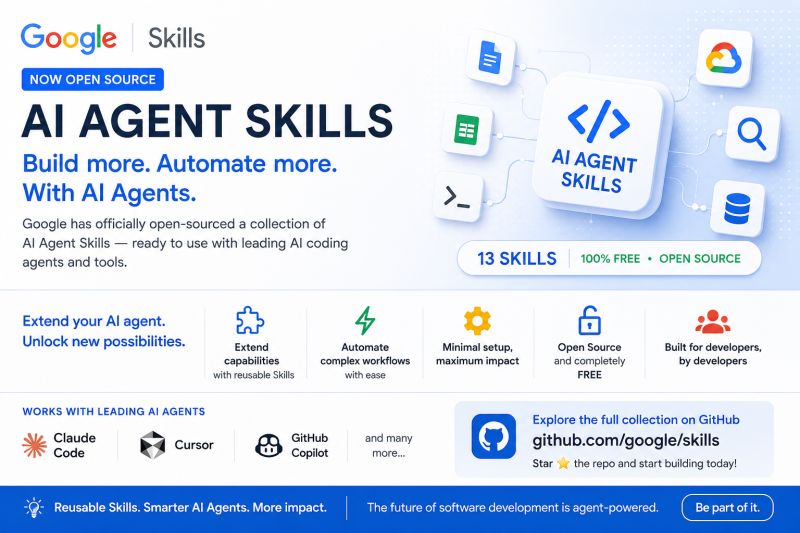
The repository currently includes 13 ready-to-use Skills that work with popular AI coding assistants such as Claude Code, Cursor, GitHub Copilot, and other AI agents.
Rather than building everything from scratch, these Skills act as reusable building blocks that extend an AI agent’s capabilities. They enable more advanced workflows, automate repetitive tasks, and simplify complex development processes with minimal setup.
💡 Why this matters:
2. Step-by-Step Diagnostic & Implementation SOP
To resolve or implement this standard operating procedure effectively, execute the following technical workflow:
-
The repository currently includes 13 rea: The repository currently includes 13 ready-to-use Skills that work with popular AI coding assistants such as Claude Code, Cursor, GitHub Copilot, and other AI agents.
-
Rather than building everything from scr: Rather than building everything from scratch, these Skills act as reusable building blocks that extend an AI agent’s capabilities. They enable more advanced workflows, automate repetitive tasks, and simplify complex development processes with minimal setup.
-
💡 Why this matters:: 💡 Why this matters:
-
✅ Open Source and completely FREE: ✅ Open Source and completely FREE
-
✅ Ready to integrate into existing AI wo: ✅ Ready to integrate into existing AI workflows
-
✅ Compatible with multiple AI coding age: ✅ Compatible with multiple AI coding agents
3. Production Command Scripts & Automation
1
2
3
4
5
# Check AppLocker & Software Restriction Policy blocked events in Event Viewer
Get-WinEvent -LogName "Microsoft-Windows-AppLocker/EXE and DLL" -MaxEvents 10 | Select-Object TimeCreated, Id, Message

# Inspect executable signature and authenticode integrity
Get-AuthenticodeSignature -FilePath "C:\Program Files\VendorApp\app.exe"
4. Technical Breakdown & Architecture Deep Dive
Understanding the low-level operating system mechanics and service interactions prevents unintended side effects:
<span class="cmd-tag">Administrative Security Context</span>: Operations altering system state require local administrator privileges or domain delegatory rights.<span class="cmd-tag">Service Architecture</span>: Windows services and WMI/CIM providers interact directly with the hardware abstraction layer and kernel objects.- Enterprise Scale: Implementing scripted automation reduces Mean Time to Resolution (MTTR) from hours to minutes across distributed endpoints.
5. Enterprise Verification Checklist
| Checkpoint | Verification Step | Common Remediation |
|---|---|---|
| Administrative Privilege | Run whoami /priv or verify elevated prompt |
Launch PowerShell or Terminal via Run as Administrator |
| Port & Network Health | Test TCP handshake via Test-NetConnection |
Verify firewall state and domain edge security rules |
| Service Status | Query service via Get-Service or sc query |
Restart dependent services and inspect event logs |
💡 20+ Years Banking & Enterprise IT Pro-Tip
In mission-critical banking and corporate networks, always test administrative scripts against a staging organizational unit (OU) or non-production test tenant before applying widespread changes. Keep audit logs enabled to maintain complete regulatory compliance.
🔗 Join the Live Community Discussion: Have questions or insights about this technical guide? 👉 View and join the original LinkedIn post discussion
Authored by Toan Nguyen (Toan Nguyen IT OZ) — 20+ Years Enterprise & Banking IT Experience in Adelaide, South Australia.