

This guide is Part 110 of the Windows Tips & Tricks series published by Toan Nguyen (Toan Nguyen IT OZ). In Phase 3, we master core enterprise identity protocols, Kerberos authentication constraints, and infrastructure time synchronization. Follow on LinkedIn.
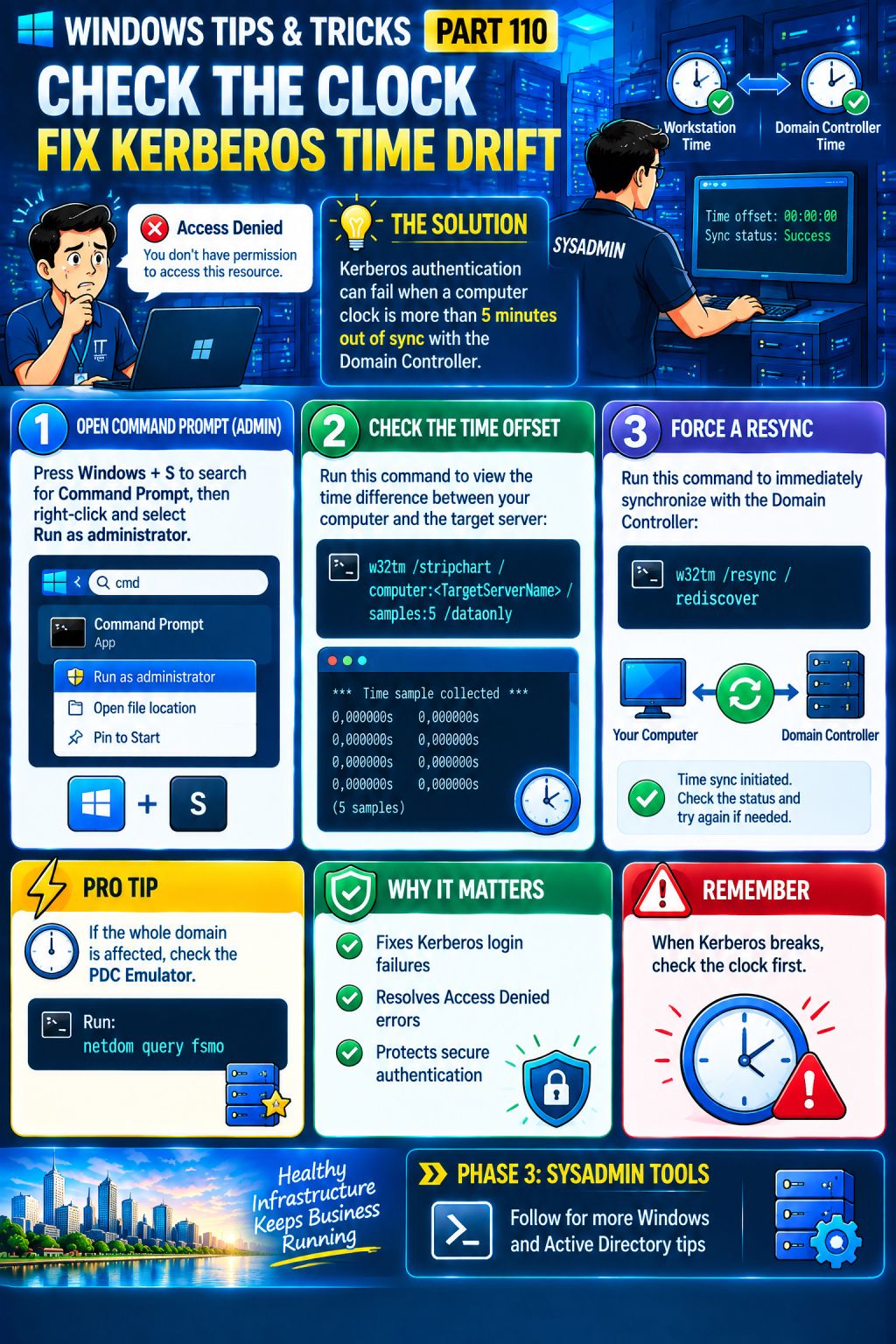
1. Scenario Overview & Problem Context
🚀 Windows Tips & Tricks – Part 110
⏱️ Check the Clock: Fix Kerberos Time Drift
- Users suddenly cannot log in to the domain.
- Network drives and shared folders return “Access Denied.”
- Event Viewer is flooded with cryptic Kerberos authentication errors.
⚠️ Before resetting user passwords, rebooting Domain Controllers, or assuming that Active Directory database is corrupted — check the system clock!
In an Active Directory environment, time synchronization is not just a cosmetic setting — it is a critical security requirement. Kerberos ticket authentication will fail immediately when an endpoint workstation or server clock differs from the Domain Controller by more than 5 minutes (default Kerberos maximum tolerance for computer clock synchronization).
This strict threshold protects the domain against replay attacks (where malicious actors intercept tickets and attempt to reuse them later).
2. ⚡ Step-by-Step Time Drift Troubleshooting
Step 1: Open Command Prompt as Administrator
Press Windows + S to search for Command Prompt (or Terminal), right-click and select Run as Administrator.
Step 2: Check the Time Offset
Use the built-in Windows Time diagnostics tool (w32tm) to view the exact time difference (in seconds) between your machine and the target server:
w32tm /stripchart /computer:<TargetServerName> /samples:5 /dataonly
(Replace <TargetServerName> with your Domain Controller hostname, e.g., DC-01 or AD-PDC)
Example Output:
1
2
3
4
5
6
7
8
9
C:\> w32tm /stripchart /computer:DC-01 /samples:5 /dataonly
Tracking DC-01 [192.168.1.10:123].
Collecting 5 samples.
The current time is 17/09/2026 06:30:15.
06:30:15, +00.0001200s
06:30:17, +00.0001150s
06:30:19, +00.0000980s
06:30:21, +00.0001040s
06:30:23, +00.0001110s
ℹ️ If the offset exceeds
+300.0000000sor-300.0000000s(5 minutes), Kerberos ticket granting will systematically fail.
Step 3: Force Immediate Resync
If the machine is out of sync, force it to rediscover the Domain Controller and sync its clock immediately:
On local machine:
w32tm /resync /rediscover
Remotely via PowerShell (Admin):
1
Invoke-Command -ComputerName <TargetServerName> -ScriptBlock { w32tm /resync /rediscover }
⚠️ Note: Running this command remotely requires appropriate administrative permissions and enabled PowerShell Remoting (WinRM).
3. 💡 Pro Tip — Investigate the PDC Emulator
In a healthy Active Directory domain:
- Domain Member Workstations & Servers sync time with any available authenticating Domain Controller.
- Domain Controllers sync time with the PDC (Primary Domain Controller) Emulator.
- PDC Emulator must be configured to sync with a reliable external NTP source (such as
pool.ntp.orgor your enterprise GPS/hardware clock).
If multiple systems across your domain are experiencing simultaneous time drift, the PDC Emulator itself is likely out of sync.
Identify the PDC Emulator FSMO Role:
Run this command from any domain machine:
netdom query fsmo
Or via PowerShell:
1
(Get-ADDomain).PDCEmulator
Once identified, inspect the PDC Emulator’s NTP configuration and verify it reaches approved external time servers over UDP Port 123.
4. 🎯 Why It Matters for IT Operations
- ✅ Fixes Kerberos Login Failures: Eliminates mysterious domain authentication lockouts and blank login screens.
- ✅ Resolves Unexpected “Access Denied” Errors: Restores mapped drives, shared printer access, and DFS namespaces.
- ✅ Protects Database & Transaction Consistency: Prevents timestamp mismatch in SQL clustering, Exchange DAG replication, and SIEM logs.
- ✅ Catches Virtual Machine Time Glitches: Hyper-V and VMware guests often desync after host snapshots or sleep states.
- ✅ Maintains Zero-Trust Security Hygiene: Keeps Kerberos ticket validation compliant with enterprise security baselines.
5. 🎯 The Bigger Picture
When authentication suddenly breaks across the floor, do not rush to rebuild Active Directory, change trust relationships, or reset passwords.
SysAdmins do not panic when Kerberos breaks.
We check the clock. ⏱️
🔗 Join the Live Community Discussion:
Have you ever encountered a domain-wide outage caused purely by a few minutes of time drift?
👉 View and join the original LinkedIn post discussionAuthored by Toan Nguyen (Toan Nguyen IT OZ) — Enterprise Systems Administrator in Adelaide, South Australia.